Withdrawals - send USDT or ETH to your own wallet
Esta página aún no está disponible en tu idioma.
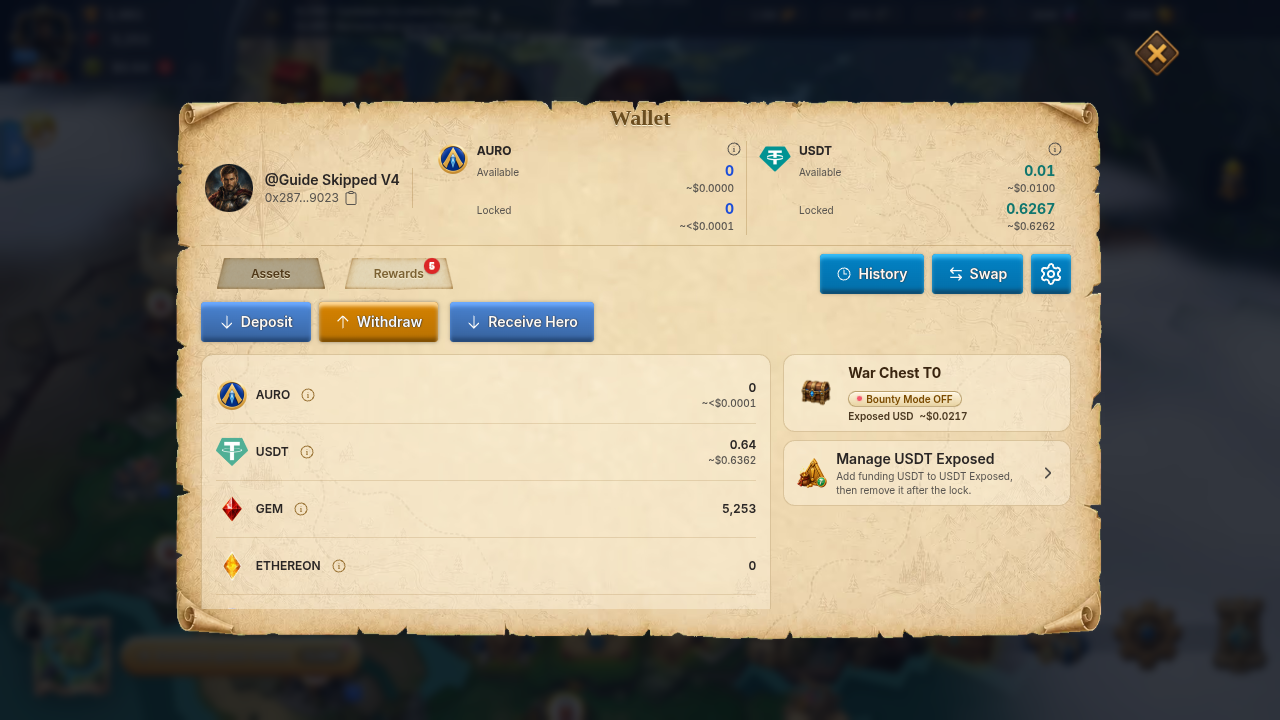
Quick answer: Withdraw from Wallet → Withdraw: pick a token, a network, where the money comes from (Funding or Reward), the address and the amount. Money you deposited yourself has no minimum and no unlock countdown. Game earnings have a minimum and go through an automatic check first.
What can I withdraw?
Section titled “What can I withdraw?”| Token | Networks | From Funding | From Reward |
|---|---|---|---|
| USDT | BNB Smart Chain, Arbitrum One | Yes | Yes |
| ETH | Arbitrum One, Robinhood Chain | Yes | No |
- Funding is money you deposited. Reward is what you earned in the game (USDT only). On the Reward tab for another token, the game tells you to switch to USDT.
- AURO withdrawals are closed. The game shows: “AURO withdrawals are closed. Sell your AURO for USDT, then withdraw USDT.” Use Sell AURO for USDT, then withdraw the USDT.
- No XLords fee is added on USDT or ETH withdrawals: the amount you enter is the amount sent.
- Rewards that are still counting down under Pending Rewards cannot be withdrawn yet. See USDT battle loot for how rewards unlock.
How do I withdraw?
Section titled “How do I withdraw?”- Open Wallet and tap Withdraw.
- Pick the Asset and the Blockchain network.
- Choose where the money comes from: Funding or Reward.
- Choose the destination, Your own wallet or Someone else’s wallet, then Enter Address.
- Enter the Amount, or tap MAX.
- Confirm. You see Withdraw request submitted! and the request appears in your history.
After a request is approved, it should arrive in 3-5 minutes. Requests held for review wait longer, see below.
What are the minimums and limits?
Section titled “What are the minimums and limits?”| Rule | Value |
|---|---|
| Minimum from Funding | None |
| Minimum from Reward, first withdrawal | 5 USDT |
| Minimum from Reward, after each completed reward withdrawal | Goes up by 5 USDT each time, up to 100 USDT |
| Requests in progress at once | 3 from Funding and 3 from Reward |
- To withdraw from Reward, your unlocked Reward balance must be at least the minimum, and no other Reward withdrawal can be in progress. The game shows “You can withdraw up to … right now.”
- The Reward minimum is shown on the screen as Minimum withdraw per request. Tap the info icon next to it to see the ladder. Money you deposited yourself never has to wait for the Reward minimum.
- The address must be valid for the network you picked. It cannot be a game deposit address, and it cannot be the token’s own contract address.
- Banned or deactivated accounts cannot withdraw.
Review and status
Section titled “Review and status”Every Reward withdrawal first goes through an automatic safety check. If it is clean and none of the rules below applies, it is released on its own. Otherwise it waits in Pending for a manual review. Any request also waits for manual review when:
- a Reward withdrawal is 50 USD or more;
- a Funding withdrawal is 1,000 USD or more;
- your withdrawals in the last 24 hours, Funding and Reward together, add up to more than 100 USD.
A review has no fixed time. Your amount is held for the request while it waits.
| Status | What it means |
|---|---|
| Pending | Submitted, waiting for review, or queued to send. |
| Processing | Being sent to the blockchain or waiting for confirmation. |
| Completed | Sent. Tap the transaction link in your history to see it on the explorer. |
| Failed | Not sent. It was rejected in review or the send did not go through. |
| Refunded | The amount went back to your balance. |
| Cancelled | The request was cancelled. |
If a send fails for a temporary reason, for example the network is busy, the game retries on its own. The first wait is 5 minutes and the waits grow up to 1 hour. The request can stay Processing meanwhile. Do not submit the same withdrawal again.
Find your requests in Wallet → open wallet history → Withdraw. Each row shows the amount, address, time and status.
If something goes wrong
Section titled “If something goes wrong”| What you see | What to do |
|---|---|
| “Invalid wallet address” | Check the address for the network you picked. |
| “Minimum withdraw amount is …” | Raise the amount, or withdraw from Funding instead. |
| “Insufficient balance” or nothing available | Your Ready to transfer out amount is lower than you entered. Check Pending Rewards. |
| “Too many active withdrawals” | Wait for your current requests to finish. |
| “Withdrawal is temporarily unavailable, please retry later” | Try again later. |
| “Withdrawal recipient cannot be an internal deposit address” | Use your own external wallet address. |
If the wording differs a little, the meaning is the same.
Pending for a long time, Failed, or Refunded but the balance looks wrong. Open a ticket from Setting → More → Support, see Contact support. Send:
- the date and time, the token, the network and the amount;
- the destination address;
- the status you see (Pending, Processing, Failed …);
- the transaction link from your history, if there is one;
- a screenshot of the withdrawal row.
Support cannot promise a date or a result. Never send your private key, seed phrase, or wallet password.
Related: Deposits.