Store and packs
이 콘텐츠는 아직 번역되지 않았습니다.
Quick answer: Open Store to buy packs. You can pay with your in-game balance, with crypto (USDT), or, inside Telegram, with Telegram Stars. Once the payment is confirmed, items go to My Bag and Gems go straight to your Gem balance.
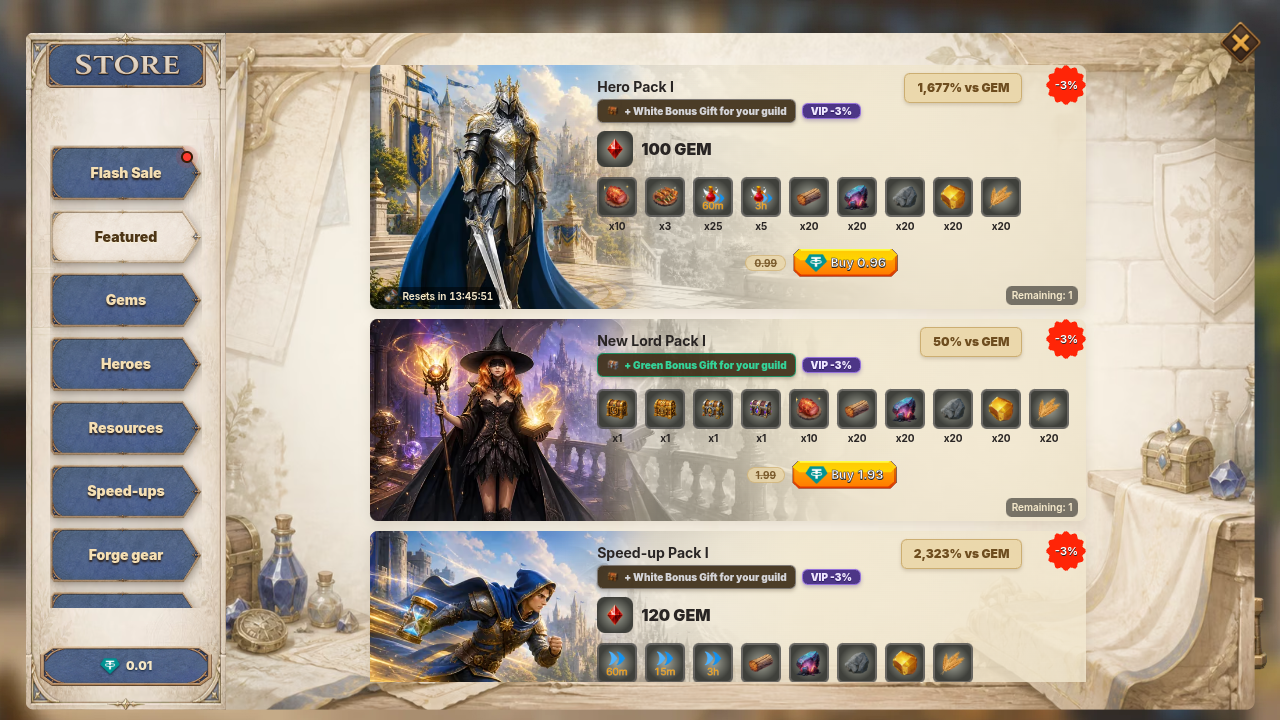
What you can buy
Section titled “What you can buy”The Store has these tabs: Featured, Gems, Hero, Resources, Speed-up, Forge and Monthly. Limited-time sales (for example a Flash Sale) can add an extra tab for as long as they run.
- Gem packs: seven fixed Gem packs in the Gems tab (see Gem packs). Pay with USDT balance, crypto, or Telegram Stars.
- Themed bundles (Hero, Resources, Speed-up, Forge): items, chests and Gems. Pay with USDT balance, crypto, or Telegram Stars.
- Monthly cards: Silver Card, Gold Card, Diamond Card. You claim a reward every day while the card lasts. Pay with USDT balance, crypto, or Telegram Stars.
- Single items: one item at a time, such as speed-ups, boosts and combat items. Pay with Gems or AURO.
- Sticker packs: one purchase per account per pack. Pay with USDT.
My Bag also has an AURO Mall tab, a Gem Mall tab and (when enabled for your account) a Guild Coin Mall tab. Packs there are paid from that currency’s balance, so no payment window opens.
Items that show an AURO price are paid from your available (unlocked) AURO. AURO still in Pending Rewards cannot pay, and the AURO price is the same number as the Gem price. If the game says “AURO payments have ended. Your AURO was converted to USDT in your wallet.”, AURO cannot pay: use Gems, or Guild Coin where the item has a Guild Coin price.
Which packs are on sale changes over time. The Store always shows the current list, price, stock and limits on each pack.
Gem packs
Section titled “Gem packs”Seven Gem packs are on sale. They are paid in USDT (balance or crypto) or with Telegram Stars. You cannot buy Gems with AURO or Guild Coin.
| Pack | Price (USDT) | Gems | First-buy bonus |
|---|---|---|---|
| Gem Pack 1 | 0.99 | 200 | x1.5 |
| Gem Pack 3 | 2.99 | 620 | x1.5 |
| Gem Pack 5 | 4.99 | 1,070 | x1.5 |
| Gem Pack 10 | 9.99 | 2,200 | x1.45 |
| Gem Pack 20 | 19.99 | 4,600 | x1.35 |
| Gem Pack 50 | 49.99 | 12,000 | x1.25 |
| Gem Pack 100 | 99.99 | 25,500 | x1.25 |
The first-buy bonus adds extra Gems the first time you buy that pack. Gem Pack 10 can be bought up to 2 times a day and belongs to a rotating sale group, so it can be missing from the list at times. Gem Pack 100 has no VIP deal.
Another one-time pack, New Lord Pack I (1.99 USDT, 400 Gems and starter items, once per account), is on sale as well. The game is also set to add its items to the very first purchase you make on an account. The Store always shows what is on sale now; whether a pack returns after it is gone is not shown in the game.
How to pay
Section titled “How to pay”When you tap Buy on a pack paid in USDT, Choose payment method opens:
- Available Balance: pay from your wallet balance. It is greyed out with “Not enough available balance” when your balance is too low. To add funds see Deposits.
- USDT: pay with crypto from any wallet or exchange. Pick the Network and Token, then send the exact amount shown to the Payment address (scan the QR code or tap the address to copy it). The window shows Waiting for payment, then Confirming on-chain…, then Payment received. The payment window stays open for 30 minutes.
- Telegram Stars: only inside the Telegram app, and only for an account linked to Telegram. Complete the payment in Telegram, then the game shows Processing your purchase…. In Telegram, the USDT option is marked Save 5% compared with Stars.
Keep the payment window open until it shows Payment received. The game checks the order every 5 seconds.
If you send a different amount
Section titled “If you send a different amount”- Less than the pack price: the pack is not bought. The full amount you sent is added to your Funding account (see Deposits).
- The price or more: the pack is delivered and the extra goes to your Funding account.
- Paid after the window closed: if the payment arrives within 24 hours after the 30-minute window ended, the pack is still delivered. After that the pack is not delivered and the amount is added to your balance instead.
- A different token or network than the order showed: the pack is not delivered. A token we recognise is added to your balance.
Limits, sales and bonuses
Section titled “Limits, sales and bonuses”- Purchase limits. Some packs allow a limited number of purchases: once per account, or a number per day (the day resets at 00:00 UTC). The pack shows Remaining or Only N left!, and Sold out when stock is gone.
- Castle level. A pack can be locked until your Castle reaches a level (Unlocks at Castle Lv N).
- Sale price. A tag such as Sale -15% means the price you pay is already reduced.
- First purchase. Some packs show -N% first purchase or x1.5 first buy!. The bonus applies the first time you buy that pack.
- VIP deal. Packs tagged VIP deal or VIP -N% get an extra discount that grows with your VIP level: 0.5% for each level, from 0.5% at VIP 1 up to 7.5% at VIP 15. VIP 0 gets none. It is taken off after the pack’s other discounts. See VIP.
- Telegram Stars price. The Stars price is worked out from the USD price at 0.013 USD per Star, with a 10% buffer added. The pack shows the exact Stars amount before you pay.
Where your pack goes
Section titled “Where your pack goes”| In the pack | Where it arrives |
|---|---|
| Gems | Your Gem balance |
| Resources, speed-ups, combat items, other items | My Bag (tabs Unique, Resource, Speed Up, Combat) |
| Chests | My Bag, Chest tab. Tap Open to open one |
| Trophies | Created for you after the purchase, so they can show up a little later than the rest |
| Monthly card reward | Tap Claim on the card once each UTC day |
A hero pack from the Hero tab gives hero EXP items (they raise a hero’s experience when used), Gems, speed-ups and resources. It does not add a new hero to your list and it does not summon one. See Hero upgrade for what the items do. A Starter Pack lists your starting heroes, resources and speed-ups; they arrive when the purchase is confirmed.
Hero packs and Hero Medals
Section titled “Hero packs and Hero Medals”Quick answer: no pack adds a hero straight to your list. Hero packs give Hero Medals, Starter Hero chests and hero EXP items. You summon a hero in the game with 10 of that hero’s medals.
- Hero Pack I to V form a daily ladder: 0.99, 4.99, 9.99, 19.99 and 49.99 USDT. The Store shows one step at a time, and a step unlocks after you buy the step before it. The ladder resets at 00:00 UTC. Hero Pack I has no Starter Hero chest. Pack II has 2, Pack III has 3, Pack IV has 5 and Pack V has 12.
- Starter Hero chest. Each one holds 5 Hero Medals of each of the two kinds the Store sells, a few speed-ups and 50 Stars. Open it from My Bag, Chest tab.
- Packs that give Hero Medals directly are in the table below.
Which packs give Hero Medals?
Section titled “Which packs give Hero Medals?”| Pack | Price (USDT) | Hero Medals | How often |
|---|---|---|---|
| Hero Rise Pack | 4.99 | 15 | Once per account |
| Hero I | 9.99 | 10 | Once per account |
| Hero II | 9.99 | 20 | Once per account |
| Mystic Pack | 19.99 | 12 | No limit |
| Archmage Pack | 29.99 | 20 | No limit |
| Warlord Pack | 29.99 | 20 | No limit |
Hero Rise Pack, Hero I, Mystic Pack and Archmage Pack give medals of one hero. Hero II and Warlord Pack give medals of the other. The game’s own text says Hero Medals “come from Hero Medal packs in the Store”, so these are the packs to look at. Packs come and go, so check the Store for what is on sale today.
The Store sorts packs into tabs on its own, from each pack’s name and contents. A pack can sit in the Hero tab and still give no hero reward, for example the Sovereign Pack.
Liquidity Pack refunds
Section titled “Liquidity Pack refunds”Quick answer: A Starter Pack (Liquidity Pack) puts your payment into a locked Liquidity NFT. You can take it back after the lock ends. If your position was refunded after the AURO price drop, you claim that refund as ETH and USDT in your in-game wallet once the lock ends.
Open DeFi Market → My NFTs → Liquidity. Each position is one card.
- A normal position shows Locked until a date. You can claim its trading fees with Claim fees, and withdraw its value after it unlocks. What comes back can be higher or lower than what you paid. See Starter Pack and gift codes.
- A refunded position shows “AURO’s price crashed on” a date. It says the position is refunded at its average price over the 24 hours before the crash, and shows that price per AURO. The refund is a fixed amount of ETH and USDT, shown on the card as +ETH and +USDT.
What do the refund cards say?
Section titled “What do the refund cards say?”A refunded position moves through these states:
| Card says | What it means |
|---|---|
| Refund locked until a date | The lock has not ended. Claim refund is disabled. |
| Ready to claim | The lock ended. Tap Claim refund. |
| Claimed | “Added to your in-game wallet”. The ETH and USDT are in your withdrawable balance. Withdraw them like any other balance, see Withdrawals. |
Good to know about refunds
Section titled “Good to know about refunds”- The refund amounts are fixed when the position is refunded. Claiming pays exactly those amounts and does not recalculate them.
- Once a position is in the refund flow you can no longer claim fees from it, add to it or remove it.
- A purchase whose position was never created shows as a Starter Liquidity Pack card with the same refund steps.
- If Claim refund fails, the card says “Couldn’t claim. Try again.”
Chests: Reward Chest and USDT Chest
Section titled “Chests: Reward Chest and USDT Chest”Quick answer: A Reward Chest pays a random amount of AURO when you open it, and the amount can be zero. A USDT Chest is a chance at real USDT. Chests wait in your My Bag → Chest tab until you open them.
- Why a Reward Chest can pay 0 AURO. The amount is rolled when you open it and “may vary between chests”. An opening can come out as a miss with no AURO, for example when the day’s AURO reward pool has no room left.
- Where the AURO goes. You can find it in your wallet under Pending Rewards. Earned AURO starts there and unlocks after a countdown, 96 hours (4 days) for chest rewards. After that it is part of your available balance. See Withdrawals and USDT battle loot.
- Which rewards give which chest. Some rewards give a USDT Chest instead of a Reward Chest. Check the chest’s name in your Bag. Reward Chests you already own keep working. The list of rewards that give each kind is not published: TBD (needs source).
- Do unopened chests expire? The game stores each chest type in your Bag only as a number you own. It does not store an expiry date for them.
Reward Chest openings are finished by the game after you tap Open. If you opened one and the result is late, wait a few minutes. Unfinished openings are retried automatically after about 5 minutes.
Friend Chests
Section titled “Friend Chests”A Friend Chest comes from your referrals: you get one for each friend who qualifies. Opening one makes 4 draws. Each draw gives one of these, and the reward goes straight to your stock, so nothing new shows up in My Bag:
- 30,000 Food
- 7,000 Wood, Ore or Stone
- 3,000 Gold
- 100 Ethereon (about 1 draw in 5)
A draw never gives Gems. Bigger chests come at 3, 10, 25 and 50 qualified friends, and then every 20 friends from the 70th: Friend Circle Chest, Friend Alliance Chest and Friend Legend Chest. See USDT, wallet and shop FAQ for what to check when a chest seems empty.
A chest will not open
Section titled “A chest will not open”- “You don’t have enough chests”: you chose more than you own.
- “The number of chests provided is incorrect” or “You don’t have that many chests waiting to open. Please try a smaller amount.”: open fewer at once.
- The result never arrives after several minutes: open a ticket and send the time you opened it and how many chests you opened.
Hero Chest and other pack changes
Section titled “Hero Chest and other pack changes”The Store shows only what is on sale now. The Starter Hero chest was sold on its own for 300 Gems until 5 August 2026 (04:46 UTC) and is no longer sold on its own: you now get it inside packs (see Hero packs and Hero Medals). The game does not say why a pack was removed. A pack that is no longer shown cannot be bought. Items you already own stay in your Bag.
Packs, prices, contents and limits can change between updates, and the Store always shows the current ones. The game has no setting to warn you before a pack changes: TBD (needs source) for any announcement channel.
Shield items in the game today are the 4-hour and 8-hour shields. For what a shield does, see Shield. Mall chests still hold shields: Honor Chest (2 Shield (8 hours) and 1 Shield (4 hours)), Gallantry Chest (3 Shield (8 hours)) and Valor Chest (2 Shield (4 hours)). These three chests were last changed on 15 September 2026. What they held before is not recorded, so this page cannot confirm or explain an earlier shield length.
To send feedback on pack value, prices or changes, open a ticket from Setting → More → Support (Contact support). A ticket does not promise a change, a refund or compensation.
Gift codes and social quests
Section titled “Gift codes and social quests”- Gift codes. Codes are created by the XLords team, each for one pack, with its own expiry date and number of uses. Enter yours in Store → Gift code. Why a specific account has not received a campaign code is not visible in the game.
- Social quests. Quests that need X (Twitter) ask you to link your X account first (“Link Twitter (X) Account”). Without it you see “Please link your Twitter (X) account first”. The game checks the follow, and the like and retweet, with X. Which social quests are active today is not published: TBD (needs source).
If something goes wrong
Section titled “If something goes wrong”- You paid but see nothing. Follow I bought a pack and did not receive it.
- “Payment unavailable” or “Could not create the payment order”. Close the window and try again. If it keeps happening, open a ticket from Setting → More → Support (see Contact support).
- Telegram Stars is missing. Stars only appears inside Telegram. Outside Telegram, pay with Available Balance or USDT.