Upgrading heroes - level, grade, rank, burn and merge
이 콘텐츠는 아직 번역되지 않았습니다.
Quick answer: A hero grows three ways. Level uses Hero EXP items from your Bag (max 60), Grade uses medals of that hero’s type plus a wait (Common to Tempered), and Rank uses a full set of trophies (max 8). You can also burn or merge spare Genesis heroes into medals.
They use different things, so “upgrade” can mean any of them.
| What | What raises it | What it costs |
|---|---|---|
| Level | Hero EXP | EXP items from the Bag, such as Honey Baked Ham |
| Grade | Medals of that hero’s type | Medals plus a wait (see the table below) |
| Rank | Trophies (hero gear) in all six slots, then Up Rank | Trophies plus a wait for some ranks |
Higher grade makes the hero’s Battle Skills stronger. Higher rank unlocks more Battle Skills. Level adds to the bonus the hero gives your army.
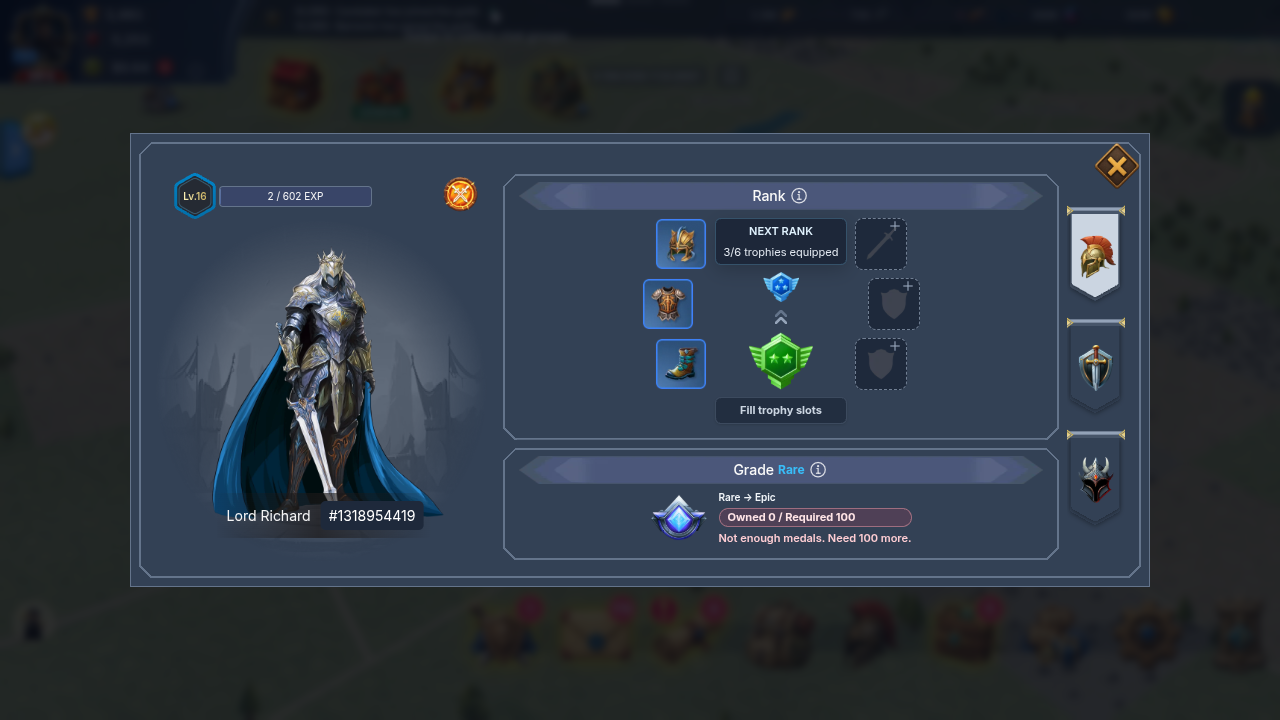
Level comes from Hero EXP, and a hero levels up on its own once it has enough. Max level is 60.
Use an EXP item from your Bag on the hero. Each item gives a fixed amount:
| Item | Hero EXP |
|---|---|
| Honey Baked Ham | 60 |
| Lamb Chops | 300 |
| Roast Turkey | 1,500 |
Hero packs in the Store contain these items. Fighting does not give Hero EXP on its own. Monster hunts would, but they are not open in the game today.
Each level needs more EXP than the one before. The EXP you need in total from level 1:
| To reach level | Total Hero EXP |
|---|---|
| 2 | 65 |
| 5 | 328 |
| 10 | 1,138 |
| 20 | 6,409 |
| 30 | 29,658 |
| 40 | 132,226 |
| 50 | 584,697 |
| 60 | 2,580,749 |
The game tells you when you only need part of an item to reach max level. Trophies also have a minimum hero level; see Trophies and how to craft them.
Grade costs medals, and medals are specific to a hero type. A Lord Richard medal only upgrades Lord Richard heroes.
Open the hero, tap the grade badge, check the Owned / Required line, then tap Upgrade. The medals are taken when you start. The grade changes when the timer ends.
| Upgrade into | Medals | Wait |
|---|---|---|
| Uncommon | 20 | 20 h |
| Rare | 50 | 60 h |
| Epic | 100 | 180 h |
| Legendary | 200 | 540 h |
| Mythic | 400 | 1,620 h |
| Tempered | 600 | 4,860 h |
Summoning a hero (Common) costs 10 medals of that type. Tempered is the top grade.
Where do medals come from?
Section titled “Where do medals come from?”- Classic heroes (the ones you summon in game): Hero Medal packs in the Store. See Store and packs.
- Genesis heroes: burn or merge spare heroes of the same type (below). You can also buy spare Genesis heroes on OpenSea and deposit them into the game.
Rules for a grade upgrade:
- Only one hero can upgrade its grade at a time on your account. A merge counts as an upgrade.
- The hero must be at home. Resting in the castle or guarding the Wall is fine. A hero that is marching, sheltered, wounded, dead, captured or listed for sale cannot start an upgrade.
- If the upgrade fails to start on the network, the medals are given back.
Also good to know:
- While a grade upgrade runs you can tap Speed Up and spend universal Speed Up items. Building, training or research speed-ups do not apply to heroes.
- A few special “coin” heroes pay in their own token instead of medals. The Upgrade screen shows the exact cost in that case.
Rank needs trophies, not medals.
- Equip a trophy of your hero’s current rank in all six slots. A trophy of a different rank is refused with “Only Hero rank N can equip this”.
- When the screen says Ready to upgrade, tap Upgrade now (Up Rank).
- Wait for the timer, or Speed Up.
Waiting time into a rank: Rank 2 takes 20 h, Rank 3 takes 60 h, Rank 4 takes 180 h. Ranks 5 to 8: TBD (needs source). The timer on the Rank screen is the truth for your hero.
Equipped trophies cannot be taken off again. Max rank is 8. Only one hero can raise its rank at a time.
Burn: turn a spare Genesis hero into medals
Section titled “Burn: turn a spare Genesis hero into medals”Burning and merging work for Genesis heroes only. Classic heroes cannot be burned.
A burn gives you 5 medals plus every medal that hero’s grade upgrades cost, as medals of the same type:
| Hero grade when burned | Medals you get |
|---|---|
| Common | 5 |
| Uncommon | 25 |
| Rare | 75 |
| Epic | 175 |
| Legendary | 375 |
| Mythic | 775 |
| Tempered | 1,375 |
The hero NFT is gone for good, with its level, grade and rank. Any trophies equipped on it come back to your trophy inventory as new trophies of the same type.
How: open the hero and tap Burn for medals, or pick heroes in Manage (Advanced Hero Manager) and tap Burn. Tick the confirmation and tap Burn hero.
Only a hero resting in the castle can be burned. Not allowed: a hero guarding the Wall, marching, upgrading, or with a grade or rank action still running. The burn runs on the network, usually in a few seconds. The screen shows Burning… and then +N medals.
Merge: spare heroes into one grade-up
Section titled “Merge: spare heroes into one grade-up”Merge burns spare heroes of the same type to pay the medals for the next grade of a target hero of that type.
- In the target’s grade screen, or in Manage, tap Merge.
- Pick spare heroes of the same type. Up to 120 per merge. Just enough picks the fewest.
- The total needs to reach the medal cost of the next grade. Extra medals stay with you.
- Read Lost for good, tick the confirmation, tap Merge.
The target must be at home and not already upgrading. One merge at a time. After the spares burn, the target starts its normal grade upgrade and timer. If a merge stops, the medals from heroes already burned stay with you.
Why is Upgrade dimmed or stuck?
Section titled “Why is Upgrade dimmed or stuck?”Upgrade button is dimmed. The line under it says why: not enough medals (“Need N more”), a merge or another hero is upgrading, or the hero is busy. Bring the hero home first.
“These heroes don’t give enough medals for the next grade. Add more heroes.” The spares you picked are worth less than the next grade costs. Add more.
“One of these heroes is already in a merge. Wait for it to finish.” Wait for the running merge, then try again. “Finish the current grade upgrade before merging into this hero.” means the target is still upgrading.
Stuck on Upgrading. Check the timer. Grade waits are long (see the table). Use Speed Up if you have universal speed-ups.
Cannot scroll to the Upgrade button. On a small screen, scroll inside the hero window. If the button is still out of reach, close and reopen the game.
If something goes wrong
Section titled “If something goes wrong”“I burned heroes and no medals appeared.”
- Wait a minute and reopen the hero list. Burns finish on the network and the screen shows Burning… until they do.
- Look at the right hero type. Medals are credited as medals of the burned hero’s type, so they show in the Owned / Required line of a hero of that type, not as a general item.
- Check the list: a hero that says Not burned or Couldn’t burn this hero is still in your roster and nothing was taken. Tap Try again.
- If the heroes are gone from your roster and the medals still have not shown after a few minutes, open a ticket (below).
“My medals were taken but the hero did not upgrade.”
- Open the hero. A running grade upgrade shows a timer. If it is there, the upgrade worked. Wait for the timer, and do not tap Upgrade again.
- The upgrade goes through the network first. If that step fails or is cancelled, the game puts the medals back by itself. Check the Owned / Required line again after a few minutes.
- If the request was already sent and then got stuck, the game does not give the medals back by itself, because the upgrade might still go through. Close and reopen the game, wait a few minutes, then open a ticket (below).
Contacting support
Section titled “Contacting support”If a burn, merge or upgrade took your hero or medals and nothing changed after a few minutes, open a ticket from Setting > More > Support (steps in Contact support). Include the hero name and its NFT ID (shown on the hero card), roughly when it happened, and a screenshot of the hero list or Upgrade screen. Support cannot promise a result before checking your account.