Moving your castle - relocate and migrate to another kingdom
You can move your castle in three ways. Which one you use depends on where you want to go.
| You want to… | Use this item | Where it works |
|---|---|---|
| Pick an exact spot in your own kingdom (for example next to your guild) | Transportation | Your current kingdom |
| Land on a random open spot in your own region | Random Relocate | Your current kingdom |
| Go to a different kingdom | Migrate Scroll | Another kingdom |
The item you hold decides what you can do. A Migrate Scroll cannot move your castle inside your kingdom, and Transportation cannot take you to another kingdom. Check the name in your bag before you open a ticket.
There is no “teleport to my guild” button. To live next to your guildmates, find a free spot beside them on the map and move there with Transportation. If your guild has a Stronghold, see Stronghold for who may move inside its zone.
Move inside your kingdom (Transportation)
Section titled “Move inside your kingdom (Transportation)”- Open the world map and find a free spot of land. Zoom in enough to see castles and resources around it.
- Tap the empty land. A Transportation panel opens with a Transport button.
- Tap Transport. The window shows how many you have (Have: N).
- You have one: tap Use.
- You have none: the same button shows the price. Tap it and confirm the purchase, and the move runs right after it.
- If the panel warns that your Shield will end, read it before you continue (see Shield).
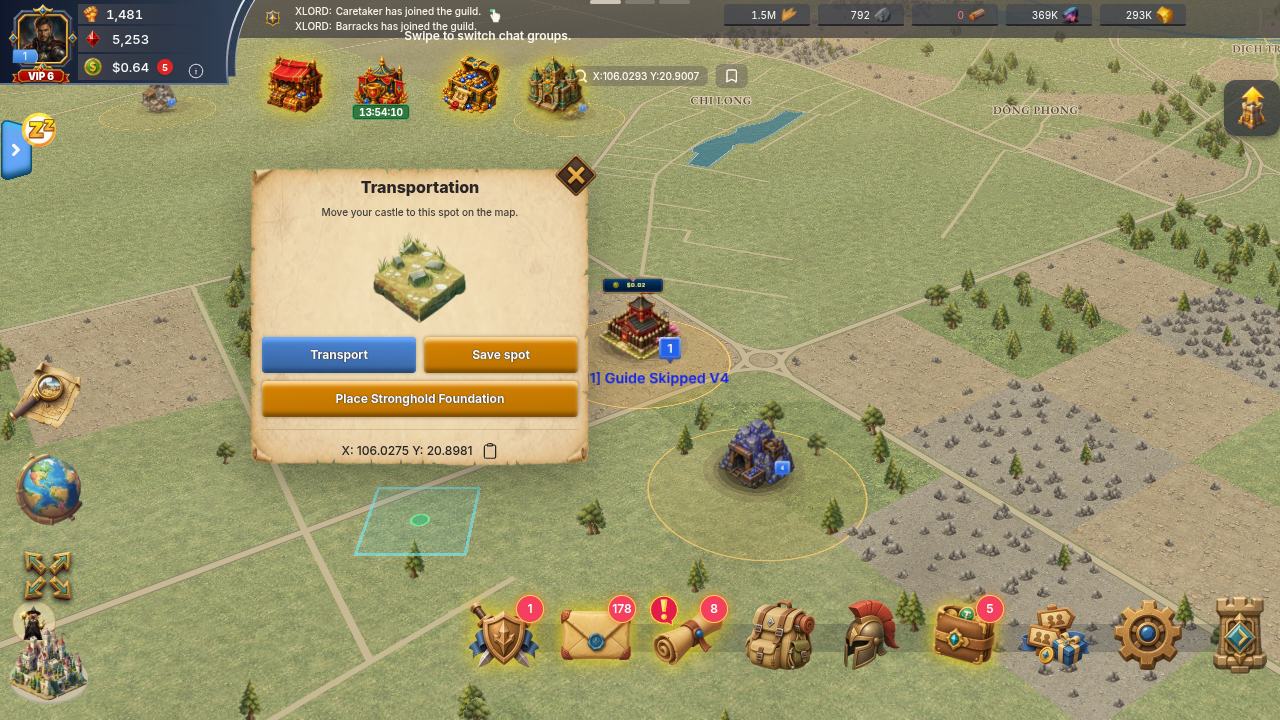
Your gathering and stationed armies move with your castle. A move that the game refuses does not use up your item.
If you use Random Relocate instead, open the same window and tap Use Random Relocate, then Relocate in the “Relocate to a random spot?” question. Your castle moves to a random open spot in your own region and uses 1 Random Relocate item. This window has no buy button for Random Relocate, so you need to already own it. If no free spot is open at that moment, the game refuses and keeps the item. Try again a bit later.
Why the Transport button is greyed out or refuses
Section titled “Why the Transport button is greyed out or refuses”| What you see | What it means | What to do |
|---|---|---|
| Button greyed, spot is water | You cannot place a castle on water. | Pick land. |
| “This spot is too close to a nearby castle or resource. Please pick a farther location.” | Castles and resources need 100 m of clear space. The panel shows the nearest one and draws a red circle. | Pick a spot outside the red circle. |
| “You can’t move your castle this close to a fortress. Pick a spot further out.” | The inner ring around a fortress is closed to castles. | Pick a spot further from the fortress. See Fortress. |
| “Moving here ends your Shield right away, and it is not refunded. Continue?” | The outer ring around a fortress does not allow Shields. You may settle there, but your active Shield ends. | Confirm only if you accept losing the Shield, or pick a spot outside the outer ring. |
| “You cannot move into another guild’s Stronghold while its walls hold.” | Only the owning guild’s members may move inside a Stronghold zone, until its walls are breached. | Pick a spot outside the zone. |
| “You can’t move into a Stronghold while your Shield is active. Wait for it to end or pick a spot outside.” | Even your own guild’s Stronghold is closed to you while your Shield is up. | Wait for the Shield to end, or pick a spot outside. |
| “That location is outside the eligible region. Choose a highlighted location.” | A normal move must stay inside your own Development Zone region. | Pick a spot inside the highlighted border. |
| “Your castle is preparing to relocate…” | A Development Zone graduation is in progress and owns your next move. | Wait for the graduation to finish. |
| “Castle must be relocated within your kingdom.” | The spot is outside the kingdom’s land or too close to its border. | Pick a spot further inland. |
| “Relocation requires all armies at home.” | An army is still marching out or returning. | Wait for it to get home, or recall it. See Marches and rallies. |
| “Cannot relocate during a rally battle” | You have a rally running. | Wait until it ends. |
| “Item not found in your bag.” or “Insufficient item” | You do not hold the right item (or enough of it). | Check the item name in your bag against the table at the top. |
| “Too many requests. Please try again later.” | Two actions hit at once. | Wait a few seconds and try once more. |
Move to another kingdom (Migrate)
Section titled “Move to another kingdom (Migrate)”- Tap the globe button on the map’s side menu to open Select Kingdom. Pick the kingdom and tap Submit.
- The map now shows “You are in the Kingdom of …”. This is only a preview, your castle has not moved. Tap Exit to come back to your own kingdom.
- Tap empty land in that kingdom. The panel now has a Migrate button instead of Transport.
- Tap Migrate. The window shows the cost, for example “Cost: N Migration Scrolls”, and how many scrolls you hold. If you are short, the button reads “You need more: (N items)”. If you have enough, it reads “Use (N items)”. Tap it to move.
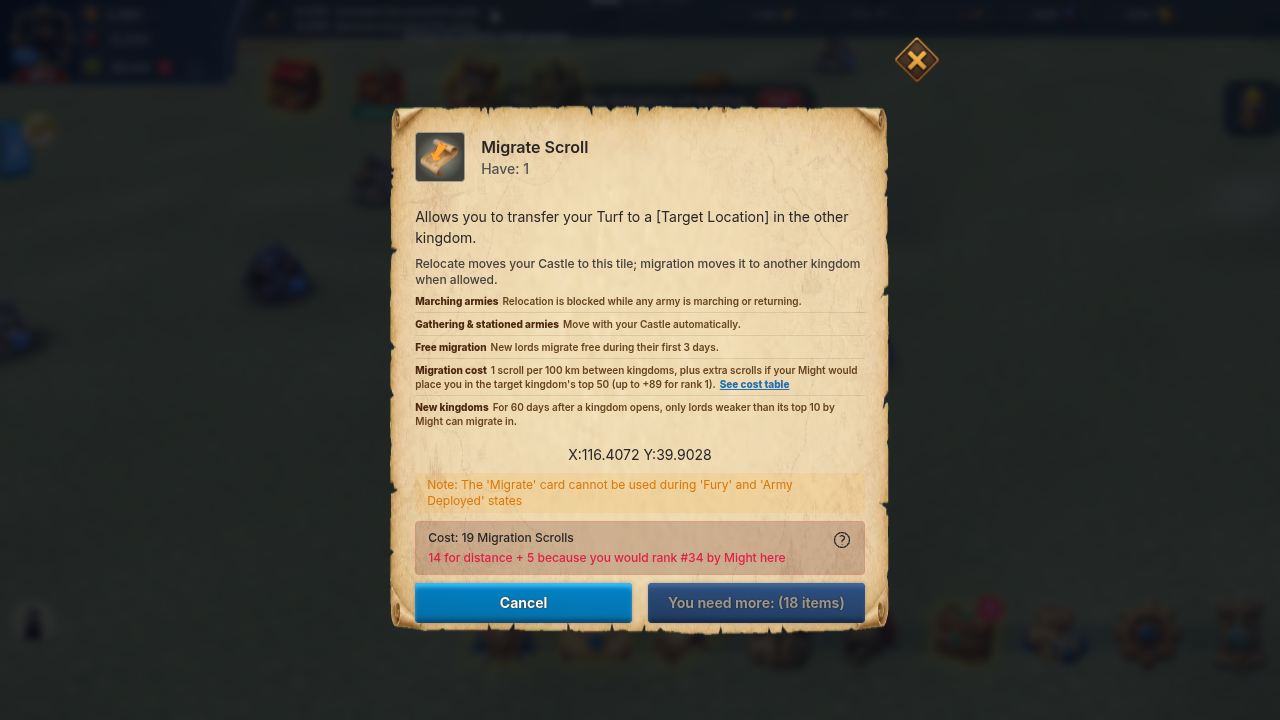
What it costs
Section titled “What it costs”- Free for new lords. In the first 3 days (72 hours) after your castle is created, migration costs nothing. The window shows “Have: Unlimited” and the time left.
- Otherwise the price is Migration Scrolls: 1 scroll for every 100 km between the two kingdoms (rounded up), plus an extra amount if your Might would put you in the top 50 of the kingdom you are joining. The game shows the exact total and lets you open the See cost table.
- Your rank there is 1 plus the number of lords stronger than you. The extra scrolls by rank are:
| Your rank in the target kingdom | Extra scrolls |
|---|---|
| 1 | 89 |
| 2 | 64 |
| 3 | 49 |
| 4 | 34 |
| 5 | 29 |
| 6 | 27 |
| 7 | 25 |
| 8 | 23 |
| 9 | 21 |
| 10 | 19 |
| 11-13 | 17 |
| 14-16 | 15 |
| 17-18 | 13 |
| 19-20 | 12 |
| 21-22 | 11 |
| 23-24 | 10 |
| 25-26 | 9 |
| 27-28 | 8 |
| 29-30 | 7 |
| 31-32 | 6 |
| 33-35 | 5 |
| 36-38 | 4 |
| 39-41 | 3 |
| 42-45 | 2 |
| 46-50 | 1 |
| 51 or lower | 0 |
The scrolls are taken only after the move succeeds. A refused migration costs nothing.
Rules for migrating
Section titled “Rules for migrating”- Free migration ends when you attack. It ends for good the first time you launch a solo castle attack, start a castle rally, or join an offensive castle rally. Cancelling or recalling the attack does not give it back. The game warns you before that first attack.
- No migration during Fury. Scouting, attacking and joining rallies start a Fury timer. While it runs, you get “Fury status can’t migration kingdom”. The timer depends on your castle level: 1 minute at levels 1-8, 2 minutes at levels 9-12, then (level - 10) minutes at levels 13-24, and from 15 minutes at level 25 up to 25 minutes at level 30. Wait for it to end.
- Your armies must be home. Any army you have out blocks the move, including gathering ones. Armies you sent as reinforcements or garrison to other castles do not block it.
- No migration during a rally you started.
- Fortress titles. If you hold a fortress title, it is removed when you migrate.
- Trade lock. After you change kingdom you must wait before trading in the Agora. The game shows the remaining time.
- Shields. The same Shield rules apply as for moving inside your kingdom (fortress outer ring, Stronghold zones).
- Zones for new players. If you are still in a Development Zone, your landing spot must be in a region that matches your Might, and that region must have room: “A destination is being prepared” or “This zone doesn’t match your Might. Pick a zone for your Might level.” means pick another highlighted spot or try later.
- New kingdoms can be locked. Kyoto is the only kingdom with this rule today. For its first 60 days only lords with less Might than everyone in its top 10 can migrate in. The window then says “This kingdom is new: only lords weaker than its top 10 by Might can migrate in until (date)”. Free migration does not skip this lock.
If your castle is not on the map
Section titled “If your castle is not on the map”Check these in order:
- Are you looking at another kingdom? If the top of the map says “You are in the Kingdom of …”, tap Exit to return to your own.
- Check your Mail. The game itself moves a castle in some cases and always sends a message with the new X and Y: “The Frontier Calls” (generic move), “Expelled from Stronghold”, “Castle Moved Out of Stronghold” (you left the guild while inside its Stronghold, or the Stronghold expanded), a castle burned inside a fortress no-shield zone, or a long absence. The mail gives the new coordinates.
- Were you away for a long time? A castle whose owner has been offline for 30 days (a bit more in higher Development Zones) is taken off the map and the owner is removed from their guild. The mail “Your Castle Left the Map” says so. It is rebuilt at a new spot the next time you play.
- Close and reopen the game, then open the map again.
If something goes wrong
Section titled “If something goes wrong”If you moved and the item or scrolls are gone but the castle did not move, or your castle is still missing after the steps above, open a ticket from Setting → More → Support (steps in Contact support). Include your kingdom, the approximate time, the item you used (Transportation, Random Relocate or Migrate Scroll), the exact message you saw and a screenshot. We cannot promise to restore items or move your castle by hand.