Tutorial steps, chapters and rewards
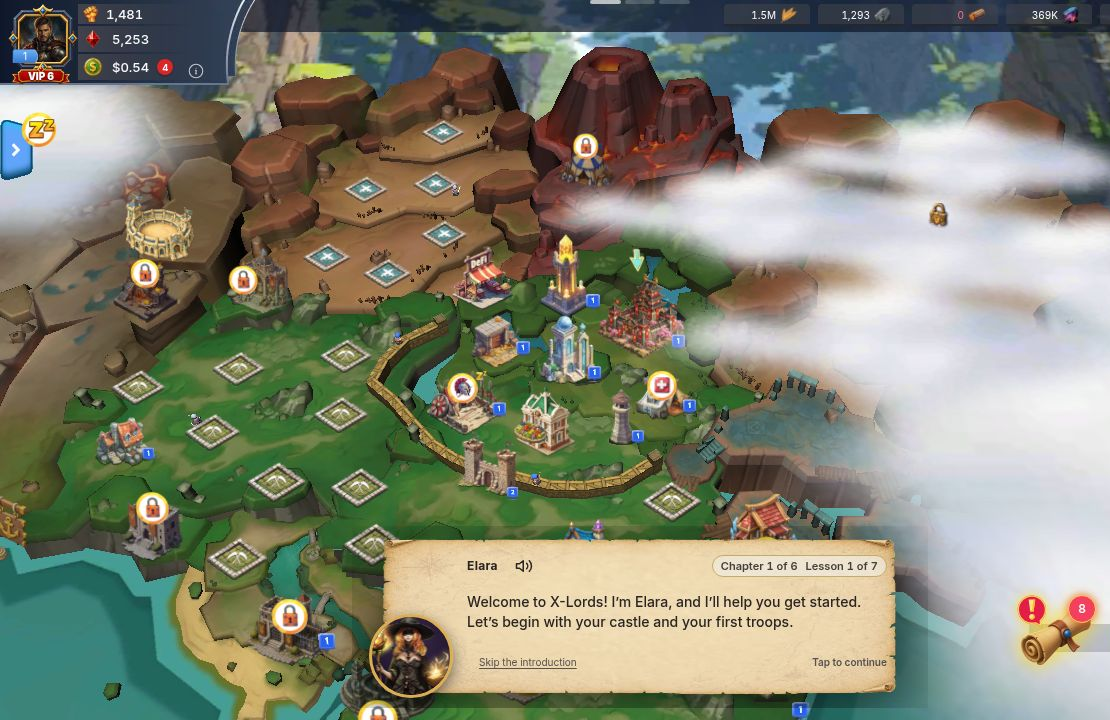
The tutorial is a guide named Elara. It has 6 chapters and 19 lesson steps. Each step is a short message with a glowing arrow or hand. Tap Tap to continue on message-only steps, or do the thing the arrow points at. Each chapter also has goals you finish in your own time, and a reward.
The chapters
Section titled “The chapters”| # | Chapter | Steps | Goals (you do these any time) | Reward |
|---|---|---|---|---|
| 1 | First Light | 7 | none | 2,000 each of Food, Wood, Stone, Ore |
| 2 | Feed the Realm | 2 | Build a farm · Build a lumber mill · Raise your castle to level 3 | 5,000 each of Food, Wood, Stone, Ore |
| 3 | Raise an Army | 2 | Train 20 troops · Start one research | 5,000 each of Food, Wood, Stone, Ore |
| 4 | First Battle | 5 | Win your first battle | $0.10 USDT value |
| 5 | Find Allies | 2 | Claim 3 quest rewards · Join a guild | $0.05 USDT value |
| 6 | Expand Your Army | 1 | Start one transformation (Ethereon Tower) | $0.05 USDT value |
In the game the chapter counter reads “Chapter 1 of 6” for First Light, and so on. USDT chapter rewards show as a value; the board says “Final payout may differ. Check your wallet for the reward you receive.” The game also warns that new rewards have a 4-day countdown before you can spend or withdraw them.
What each step asks you to do
Section titled “What each step asks you to do”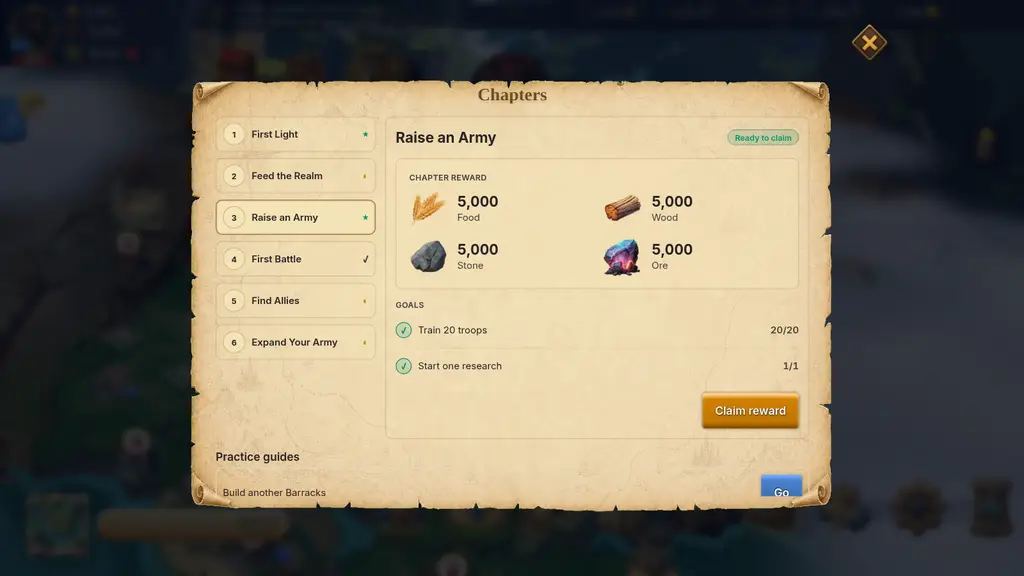
Chapter 1 — First Light
- Welcome. Elara greets you. Tap to continue.
- Open the castle. “Everything starts at the castle.” Tap your Castle.
- Free castle upgrade. Tap Upgrade. “This upgrade is on me.” Your Castle goes to level 2.
- Celebration. Tap to continue.
- Open the Barracks. Tap the Barracks.
- Train your first squad. Tap the highlighted train button. This step needs the starter squad the guide pre-selects; see Tutorial stuck? Fixes.
- You’ve taken your first steps! Tap to continue. The chapter 1 reward is paid to you right away.
Chapter 2 — Feed the Realm
- Build a Farm. Follow the arrow to an empty plot, choose Farm, review the cost, then tap Construct. The step moves on only after the Farm is built.
- Production panel. “This panel shows what each building produces every hour.” Tap to continue.
Then build a Lumber Mill and take your Castle to level 3 from Chapters.
Chapter 3 — Raise an Army
- Infirmary. “Wounded troops are not lost troops.” Look at the panel and tap to continue. An empty infirmary is fine.
- Academy. “Research is the slow road to power.” Open the research tree, look at a research, tap to continue.
Your goals: train 20 troops at the Barracks, and start one research (Academy → Economy → pick a research).
Chapter 4 — First Battle (a free practice battle on the World Map)
- Your castle. Open your own Castle on the map, then close it. Elara tells you that you start with a free 7-day shield, and that attacking or scouting a real player removes it.
- The practice target. Tap the Manor. It is a practice target, not another player’s city.
- Attack. Tap Attack.
- Auto-select. Tap the auto-select button so the game picks your best troops. The step will not continue until at least one troop is selected.
- Deploy. Tap Deploy. The practice battle costs $0 and keeps your shield. You see “Victory” and can tap Skip animation or Back to your kingdom. The chapter 4 reward is paid when the practice battle starts, so there is nothing to claim afterwards.
Before the Manor, the guide may first show you how to gather from a free resource node. If none is free nearby, you can skip it and go on to the practice battle.
Chapter 5 — Find Allies
- Quests. “Quests pay you for what you already do.” Look at the board and tap to continue.
- Guild. “Alone you hold one castle. In a guild you hold a region. Join one.” Look at the guild screen. Joining is optional for the lesson but the chapter goal stays open until you join. An application that needs approval is not membership yet.
Your goals: claim 3 quest rewards (Quests → Exclusive Quests) and join a guild.
Chapter 6 — Expand Your Army
- Army expansion. The lesson tells you to build more Barracks (a bigger training batch) and Infirmaries (room for wounded troops) on empty military plots. Tap to continue. Your goal for this chapter is to start one transformation in the Ethereon Tower: tap Convert.
What each chapter unlocks
Section titled “What each chapter unlocks”Some buttons stay hidden while the tutorial is running, until the chapter that unlocks them:
| Chapter | Unlocks |
|---|---|
| First Light | Resources bar, Castle level, Quests, Castle, Barracks, Farm |
| Feed the Realm | Construction, Lumber Mill, Quarry, Mine, Bag |
| Raise an Army | Army, Infirmary, Academy, Heroes |
| First Battle | World map, Watch Tower, Reports |
| Find Allies | Full quest board, Guilds, Embassy, Battle Hall, Chat, Events, Referral |
| Expand Your Army | Wallet, Store, Ethereon Tower, War Chest, VIP |
Claim a chapter reward
Section titled “Claim a chapter reward”- Tap Elara’s portrait at the bottom left, or open Settings → Guide Center and tap Open next to a chapter. A red number on the portrait shows how many rewards are ready.
- Pick the chapter in Chapters. Each goal has a Go button that takes you to the right screen, with a progress count such as “1/3”.
- When every goal is done the chapter shows Ready to claim. Tap Claim reward. Before that, the button is disabled and the board says “Finish every goal to claim this reward.”
The First Light and First Battle rewards are paid automatically, so they show Claimed already. A failed claim shows “Your reward could not be collected. Try Claim reward again; your progress is kept.”
Come back to the guide later
Section titled “Come back to the guide later”The game’s own words: “To revisit your goals and rewards, open Settings, then Guide Center.” Guide Center groups your chapters as Do this next, In progress and Completed. The portrait button appears when the guide is not in the middle of a lesson.
If something goes wrong
Section titled “If something goes wrong”- A lesson will not move on, or a button the arrow points at is missing: Tutorial stuck? Fixes.
- You skipped a chapter: you lose the lesson, not the goals. See what you lose by skipping.
- Reward not showing after claiming: wait a moment, check your Bag and Wallet, then open a ticket from Setting → More → Support. Contact support has the steps.