Gathering resources and error 16181
Это содержимое пока не доступно на вашем языке.
Quick answer: Tap a resource tile on the map, tap Gather, pick your troops and send them. The army mines until its bag is full or the tile runs dry, then walks home on its own with the resources.
Error 16181 (“War City armies cannot gather resources inside a protected Development Zone”) means your castle is in War City and the tile you picked is inside a lower Development Zone. Pick a tile that is not inside one of those zones. Details are below.
How to gather
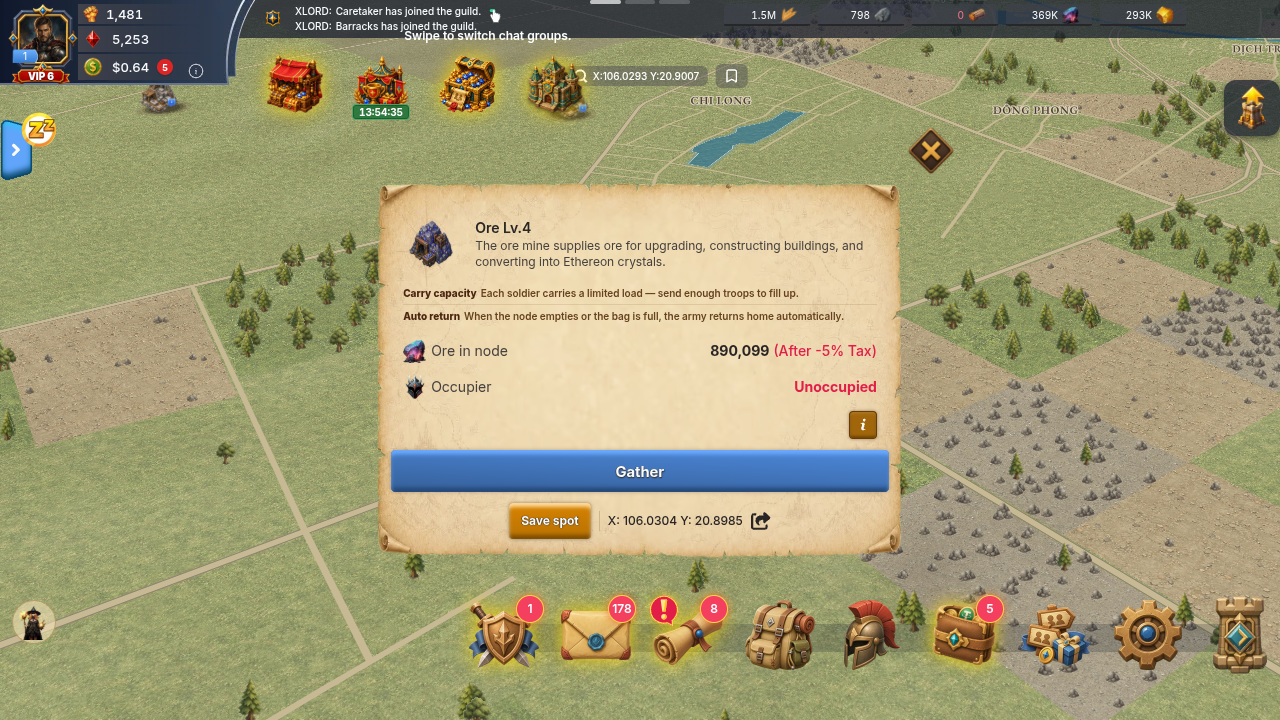
Section titled “How to gather”- Open the map and tap a resource tile (Food, Stone, Wood, Ore or Gold, each with a level).
- In the tile panel, check Mine remaining and Occupier. A free tile says Unoccupied.
- Tap Gather, choose your troops, and send them.
- Watch the march on the map. When it arrives, the panel shows Your gather and Time Left.
- The army returns by itself when its bag is full or the tile is empty. To bring it back early, open the tile and tap Return to Castle.
How much will I get, and how long does it take?
Section titled “How much will I get, and how long does it take?”- Your bag (Army carry capacity): each soldier carries a limited load, so more troops means a bigger bag. The exact load per troop is shown when you pick troops. Base load per soldier: 100 for Infantry, Ranged and Cavalry, and 50 for Siege, at every tier; carry-load bonuses raise it.
- The tile: you take the smaller of your bag and what is left in the tile. Time to fill bag is the bag divided by the tile’s gather rate. The panel shows it live.
- Kingdom tax: if the Overlord of your kingdom has set a tax, it comes off what your army brings home. The tile panel and your Resource Report show “After -X% Tax”. Members of the guild that holds the Royal Citadel pay none. See Is there a tax on gathering resources?.
How big and fast is each tile?
Section titled “How big and fast is each tile?”Higher level tiles are bigger, faster, and roll better bonus drops (see Bonus drops).
Tile size (resources in a full tile):
| Level | Food | Stone / Wood |
|---|---|---|
| 1 | 225,000 | 180,000 |
| 2 | 412,500 | 330,000 |
| 3 | 900,000 | 720,000 |
| 4 | 1,575,000 | 1,260,000 |
| 5 | 4,125,000 | 3,300,000 |
| Level | Ore | Gold |
|---|---|---|
| 1 | 135,000 | 67,500 |
| 2 | 247,500 | 123,750 |
| 3 | 540,000 | 270,000 |
| 4 | 945,000 | 472,000 |
| 5 | 2,475,000 | 1,462,500 |
Base speed (resources per second, before any boosts you have):
| Level | Food / Stone / Wood / Ore per second | Gold per second |
|---|---|---|
| 1 | 17 | 9 |
| 2 | 26 | 18 |
| 3 | 34 | 23 |
| 4 | 43 | 27 |
| 5 | 51 | 36 |
Your gathering-speed boosts make the real rate higher. Example: one army alone would need about 18 hours at the base rate to empty a Level 5 Stone tile (3,300,000 / 51), but your bag usually fills first.
Rules and limits
Section titled “Rules and limits”Marches and troops
Section titled “Marches and troops”- One army per tile per lord. If you already have an army on a tile, a second march to the same tile is refused.
- March slots. Gather marches share your march slots with attack, support and rally marches. You start with 1 slot. A slot stays used while the army is walking home, not only while it is out. When all slots are used, you see “Army deployment limit reached. Recall an existing army before deploying another.”
- Troops per gather march. The base limit is 1,600 troops per march at the start, and your other bonuses can raise it. Heroes you bring do not raise the limit on a gather march. Over the limit you see “Maximum troops per deployment reached.”
- No castle level needed. The game does not compare your castle level with the tile level, so any lord can send troops to any tile they can reach.
- Your kingdom only. You can only gather tiles in your own kingdom. When you are looking at another kingdom, Gather is greyed out.
Occupied, empty and Stronghold tiles
Section titled “Occupied, empty and Stronghold tiles”- Occupied tiles. If another lord already mines a tile, the panel shows their name. Sending troops there means a fight on arrival, and you cannot hold a Shield while you do it.
- A lord in your guild on the tile: your army turns around and goes home.
- If your Shield is active when you arrive at a tile someone else took first, your army goes home and you get a mail “Gathering failed”.
- If a lord takes the tile while your troops are still walking to it, you get a Mine taken alert. Recall them if you do not want to fight. More about Shields and marches.
- Empty or removed tiles. If the tile runs out while your army is still walking, the army turns around.
- Stronghold zones. Inside a guild Stronghold the owning guild mines freely, and outsiders only mine when the gate and transit rules allow it. Otherwise Gather is disabled with “Gate closed — only the owning guild may mine inside this Stronghold.” or “This Stronghold forbids passage — outsiders cannot mine inside its zone.” More in Guild basics.
- Tiles come and go. The map is topped up with new tiles about every 5 minutes, and tiles that run empty disappear. If none are visible near you, look further out or try again in a few minutes.
Bonus drops
Section titled “Bonus drops”Your returning army can bring extra items with the resources: gear materials, hero shards and blueprints. They are random.
- A march must gather at least 3,000 to get any roll, and bigger hauls get more rolls (up to 20 per march).
- Higher level tiles roll better: Level 1 is the weakest and Level 5 the strongest.
- Daily limits per player, reset at 00:00 UTC: 3 shards, 2 blueprints, 15 gear materials.
- New lords get a boost to rolls while their castle is Level 10 or lower, fading out by Level 18.
- USDT bonus drops from gathering are switched off at the moment (checked 2026-10-09).
Error 16181
Section titled “Error 16181”What you see: “War City armies cannot gather resources inside a protected Development Zone.”
Why it happens: Development Zones are the starter areas of the map: New Settlement, Growth Province and Borderlands. War City is the last stage, where normal kingdom rules apply. Lords in a Development Zone may gather anywhere. Lords in War City may not gather inside the earlier zones, so those tiles stay for players still growing.
What to do:
- Look at the colored zone outlines on the map. The bright border marks the area your castle belongs to.
- Choose a tile outside the lower zones, in the War City area.
- If no free tile is left near you, check again in a few minutes, because new tiles appear about every 5 minutes.
Open a ticket if: you are not in War City and still see 16181, or a tile outside the zone outlines is refused. Open a ticket from Setting → More → Support and add a screenshot of the tile, your castle position and the error. See Contact support.
Gathering pauses and “Too many attempts”
Section titled “Gathering pauses and “Too many attempts””Quick answer: “Too many attempts. Wait a moment and try again.” means the game is pacing your gather requests. It is either a short wait of a few seconds, or a pause of gathering and monster hunting that follows many “Confirm you are playing to continue.” checks in one day. A pause is not a ban, and nothing is taken from your castle, troops or resources.
Short wait (10 seconds)
Section titled “Short wait (10 seconds)”If you send the fifth gather request within 10 seconds, the game makes you wait 10 seconds. It waits and sends the request again by itself. To avoid it, send marches a few seconds apart.
The “Confirm you are playing” check
Section titled “The “Confirm you are playing” check”While you gather or hunt, the game can ask you to confirm that you are playing. Solving the check lets the next march go through. The game counts the checks you solve over a rolling 24 hours:
| Checks solved in 24 hours | What changes |
|---|---|
| Up to 24 | Nothing. |
| More than 24 | You are asked to confirm more often. |
| More than 48 | After each check, that one march goes through and then gathering and hunting pause for 60 minutes. |
- The pause stays sticky. Once you reach the pause level, every new check starts another 60 minutes. The pause level only resets after 24 hours in which you solved no new check.
- The first time you reach it you get a mail “Automated play detected” that names the pause length. It is a warning: if automated play continues your account may be locked.
- Only gathering and hunting are paused. Nothing else is paused, and your castle, troops and resources are not affected.
- It is per account, not per device, and you cannot skip or shorten it from the game.
- Why it exists: the limit catches scripts that solve checks all day. If you play by hand and reach it anyway, the pause still runs its course.
Sending several gathers at once
Section titled “Sending several gathers at once”Yes, you can have 5 gather marches out. A gather uses one march slot like any other march, so you need 5 free slots. You get 5 slots from Castle 29, and the War Chest can add more. See How many marches you can have out. Send them a few seconds apart so the 10-second wait does not trigger.
Errors 500 / 504 and a Gather button that does nothing
Section titled “Errors 500 / 504 and a Gather button that does nothing”- 500 or 504 are connection or server errors, not a rule about your account. Wait a minute, reopen the map and try again.
- Gather is greyed out: you are looking at another kingdom, or the tile is inside a Stronghold that does not let you in. See the list above.
- Gather is not greyed out but nothing happens: close and reopen the game, then open the tile again.
- If it keeps failing, open a ticket from Setting → More → Support with the tile coordinates, the time and a screenshot. See Contact support.
If something goes wrong
Section titled “If something goes wrong”Rule and limit messages
Section titled “Rule and limit messages”| What you see | What it means | What to try |
|---|---|---|
| “Army deployment limit reached. Recall an existing army before deploying another.” (16009) | All your march slots are in use, including armies still walking home. | Wait for an army to get home, or recall one. |
| “Maximum troops per deployment reached.” (16014) | You sent more troops than one gather march can carry. | Send fewer troops. |
| “This resource has already been claimed by another lord.” (16002, 16003) | Someone else holds the tile, or you already have an army on it. | Pick another tile, or recall your own army first. |
| “Supply resource to same kingdom only” (16032) | The tile is in another kingdom. | Use tiles in your own kingdom. |
| “The gate is closed — you cannot gather inside this Stronghold.” (16130) | The tile is inside a Stronghold whose gate is closed to you. | Pick a tile outside Stronghold zones. |
| 16181 “War City armies cannot gather resources inside a protected Development Zone.” | See above. | Pick a tile outside the lower zones. |
Tile and timing messages
Section titled “Tile and timing messages”| What you see | What it means | What to try |
|---|---|---|
| “Too many requests. Please try again later.” (16012) | Another map action of yours is still being processed, or the same request arrived twice (for example a double tap, or two armies sent at the same moment). | Wait a few seconds and send one army at a time. Open a ticket only if it keeps appearing with a single tap and nothing else running. |
| “Resource not found at this location.” (16011) | The tile ran dry or was removed. | Pick another tile. |
| “Finish graduation before starting another map action.” (16173) | Your castle is moving to the next Development Zone. While that is pending, new gathering is paused. | Wait until the move is finished. |
| “Region rules couldn’t be loaded. Military actions remain unavailable until the rules refresh.” (16169) | A temporary rules problem. | Wait a minute, reopen the map and try again. |
| “Your army can’t be recalled right now.” (16018) | The army cannot turn around at this moment. | Try again shortly. |
If a gather march took your troops but nothing came back, or a message not listed here keeps appearing, open a ticket from Setting → More → Support with a screenshot, the tile coordinates and the time. Support cannot promise a result in advance. See Contact support.