USDT battle loot - what can be looted, how much, and when it unlocks
Bu içerik henüz dilinizde mevcut değil.
Quick answer: When you win a battle against another player’s castle and break its wall, you take USD value from the loser’s Exposed rewards. You win it as Pending Rewards that unlock after 96 hours. Anything shown as Vault Protected cannot be looted.
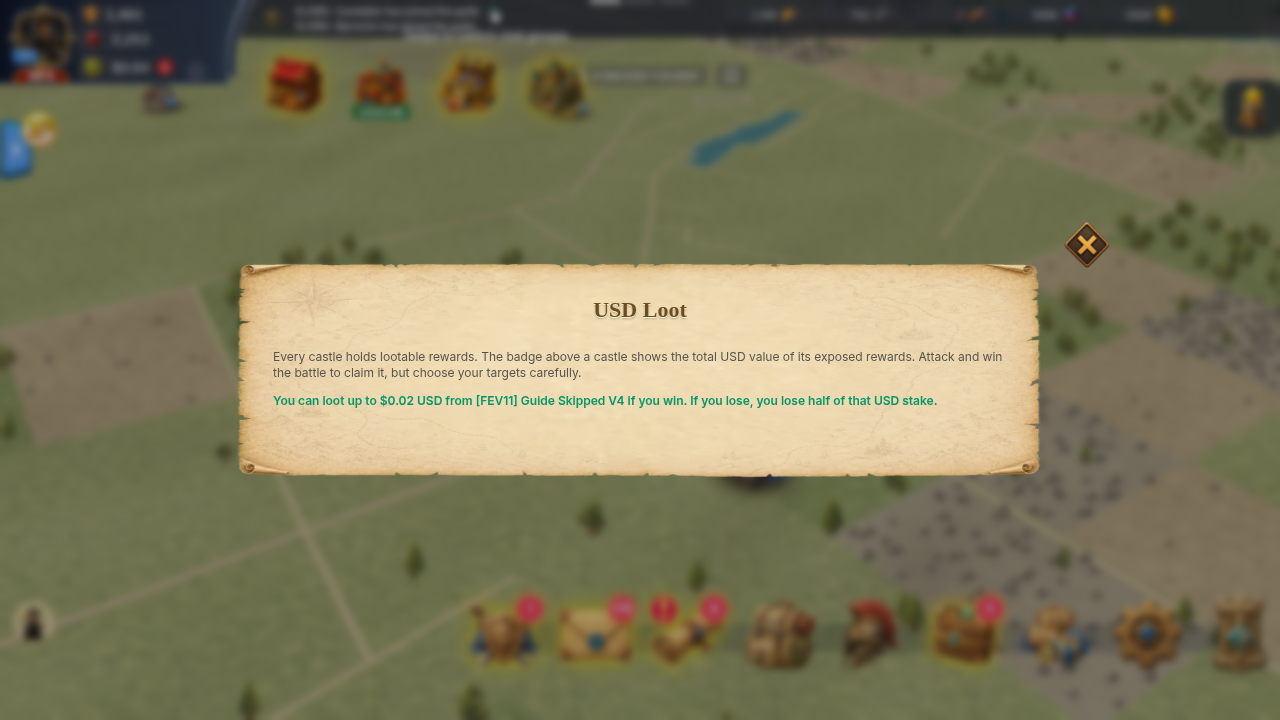
Tap the USD badge above any castle on the world map to open USD Loot. It shows how much you can loot from that player if you win, and what you put at stake.
The short version
Section titled “The short version”- Who loots: the attacker, only if the attacker wins and the wall is broken. In a rally, the rally captain gets the whole loot.
- What is lootable: the defender’s Exposed USD value. Their Vault Protected part is not.
- How much: whichever is smaller, the defender’s Exposed amount or what your surviving troops can carry.
- When it unlocks: 96 hours after the battle, in the attacker’s Pending Rewards. Until then the loot is itself At risk.
- Stake: attacking a castle with exposed rewards needs a refundable stake of 50% of the estimated lootable value.
What can be looted from you
Section titled “What can be looted from you”Your wallet splits your Pending Rewards into Vault Protected, Outside Vault, and Exposed. Only Exposed can be taken in a battle.
- The first 0.30 USD of your pending rewards is always safe.
- Your Vault covers a share of the rest. The share grows with Vault level: 5% at level 1, 14% at level 10, 24% at level 20, 30% at level 30. Upgrade the Vault to protect more. See Castle and buildings.
- Your tier sets how much of the Outside Vault part is exposed. The tier is the higher of your castle tier (castle level 5, 8, 11, 16, 21 starts tiers 1 to 5) and your Might tier (Might 50,000, 300,000, 1,000,000, 5,000,000, 20,000,000 starts tiers 1 to 5). At tier 0 or 1 with no War Chest, about 7% of the Outside Vault part is exposed. From tier 2 up, all of it is.
- An active War Chest raises the exposed share further.
- A small slice of the Vault-covered part can also count as exposed at higher tiers.
- Money you deposited stays out of reach unless you add it yourself in USD Expose (Add to pool, minimum 0.1). Funding you add there is shown as a bounty on your castle and can be looted. Remove from pool takes unlocked amounts back.
- Rewards that already unlocked into Available are not part of what an attacker can loot.
Use the Exposed figure in your wallet. It is an estimate in USD and changes with prices and your tier.
How much the attacker can take
Section titled “How much the attacker can take”The attacker takes the smallest of:
- The defender’s Exposed USD value (exposed rewards first, then exposed funding).
- The load of the attacker’s surviving troops. Every surviving soldier carries a fixed amount by troop type and tier. 1,000 tier 5 cavalry carry up to 1.375 USD. 10,000 tier 1 infantry carry up to 0.75 USD. Troops that died in the battle carry nothing.
- A War Chest bonus on the attacker’s load: +20% at tier 1, up to +150% at tier 5.
So a small army cannot empty a big pile in one fight, and Est. lootable goes up when you send more troops, until it reaches the defender’s exposed amount. The final amount can still be lower than the estimate after the fight.
Assets are taken in this order: USDT first, then AURO, each valued in USD. If the loot includes AURO, the winner receives 89% of the AURO taken. The rest is burned (10%) or paid as a protocol fee (1%).
Limits in the live game today:
- No daily loot limit applies in practice. The daily limit for attackers and for defenders is set to 10,000,000 USD.
- No cooldown applies. The same castle can be looted again right away.
- No Might-gap rule blocks loot. The Might-ratio protection is switched off.
- No loot at all between players in the same guild.
- The system-wide reward caps (gross cap 2,250, first-withdraw cap 40, per-source caps of 250 to 600) do not limit battle loot.
Stake: what you put up when you attack
Section titled “Stake: what you put up when you attack”Attacking a castle that has exposed rewards needs a refundable stake equal to 50% of the estimated lootable USD value. You see it as Stake required before you send the army.
- Your available AURO pays first, then USDT covers the rest. The stake comes out of your available balance, not your pending rewards.
- You need the whole stake. If your balance is lower, the game shows Insufficient balance for stake and the attack does not start. It does not take a smaller stake.
- To lower the stake, send fewer troops. The estimate uses the smaller of the defender’s exposed amount and what your army can carry.
- You win, or no fight happens: the stake is refunded. A win where the wall still stands gives no loot, and the stake still comes back.
- You lose: the stake goes to the defender’s pending rewards. The report shows Battle stake lost for you and Battle stake received for them. The stake follows the battle result only. The game has no separate rule for players you suspect of cheating. To report a player, see Contact support.
- If your balance is too short, deposit USDT or earn AURO, then try again. See Deposits.
The stake and the loot are two separate amounts. A lost fight costs an attacker the stake and the troops that died, never more USD than the stake. A defender who loses has their Exposed amount looted, up to what the attacker’s troops can carry, and that can be more or less than any stake.
When no fight happens
Section titled “When no fight happens”Your stake comes back, and no loot moves, when:
- the target has a shield when your army arrives;
- the target is in your guild;
- the target is gone from the map;
- the game is in maintenance;
- you recall your army before it arrives.
A castle that moved before your army arrived is still attacked. The march follows the castle, not the old spot on the map. That is a real battle, so a loss costs you troops and the stake.
When loot unlocks
Section titled “When loot unlocks”Loot you win is not available at once.
- The battle ends and the wall is broken. The loot is added to Pending Rewards and a countdown starts. The countdown is 96 hours from that moment.
- You can follow the Countdown in Pending Rewards. The loot shows as Waiting — at risk, with the source Bounty Loot. Match it with the Battle ID in your battle report.
- At the end of the countdown each reward moves to Available in its own asset (USDT or AURO), and you may get a notification.
- From Available you can withdraw. See Withdrawals for minimums and steps. AURO withdrawals are closed, so sell AURO for USDT first.
The loot you just won is exposed until the countdown ends. Another player can loot it from you, up to what their troops can carry. A reward that fails the automatic safety check can stay pending and not unlock. If your countdown ended but nothing moved, open a ticket.
You cannot speed up an unlock. Every reward from battle loot, chests, quests and other game activities waits the same 96 hours from the moment it is granted, and then unlocks on its own. To see what unlocks when, open Pending Rewards. Total Locked shows the sum, Next Unlock shows Total Unlocking for the next batch, and View unlock schedule shows how much unlocks each day. Support cannot promise compensation for a reward that unlocked on its normal schedule.
Why did my balance go down?
Section titled “Why did my balance go down?”| What you see | Why |
|---|---|
| USD loot lost: -X in a battle report | An attacker won and took part of your Exposed amount. Vault saved shows what the Vault kept. |
| Pending or exposed amount smaller after an attack | Loot takes Exposed pending rewards first, then exposed funding. |
| Battle stake lost: -X | You attacked, lost, and your stake went to the defender. |
| Available balance dropped when you launched an attack | Your stake is held until the fight ends. |
| “Looted for 5 USDT by a player with no army” | The attacker’s surviving troops decide the load, so a returned army can still carry loot. The report shows the total. |
| AURO went down | Exposed AURO can be looted once exposed USDT is used up. Check the report and Loot clawback entries in your wallet history. |
Your Funding is only at risk if you added it to USD Expose.
Protect your rewards
Section titled “Protect your rewards”- Upgrade your Vault.
- Withdraw or spend unlocked rewards instead of letting them sit in pending.
- Remove funding from USD Expose if you do not want it attacked.
- The game warns you when you leave fewer than 1,000 troops at the castle with no active shield and exposed rewards. For how shields work, see Shield rules.
- A War Chest raises your exposure and breaks active shields, so use it only when you want fights.
If something goes wrong
Section titled “If something goes wrong”- Read the battle report first. It lists loot, stake, and Vault saved. See Battle reports.
- Loot or stake missing after a battle: wait a few minutes, then reopen the report. The report can show Calculating… while the game settles it.
- Countdown over but the reward did not move, or an amount in your report does not match your wallet: open a ticket from Setting → More → Support, see Contact support.
Send support:
- the Battle ID from the report (tap Copy battle ID);
- the date and time, and the amount in the report;
- a screenshot of the report and of Pending Rewards;
- the asset (USDT or AURO).
Support cannot promise to return looted rewards, to pay compensation, or to give a date.